
On the S-Drive Lightning component System Administrators can set column headings to wrap to a second line and can set a pixel width for fields.
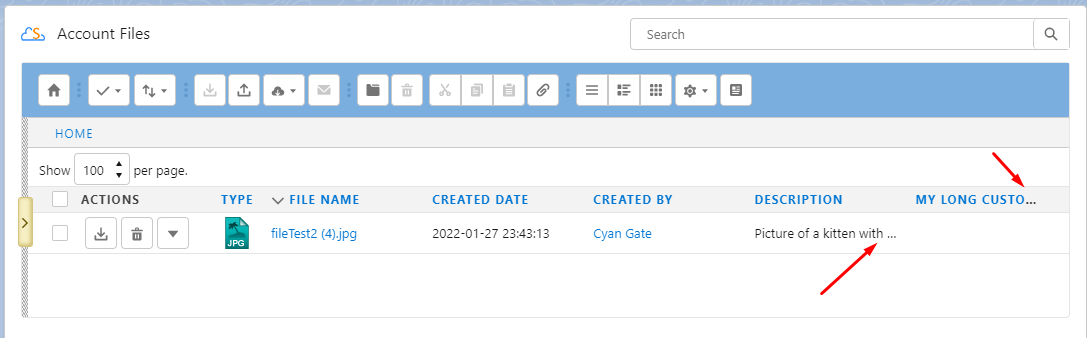
Here, there is no wrapping and the columns are set to a default width.
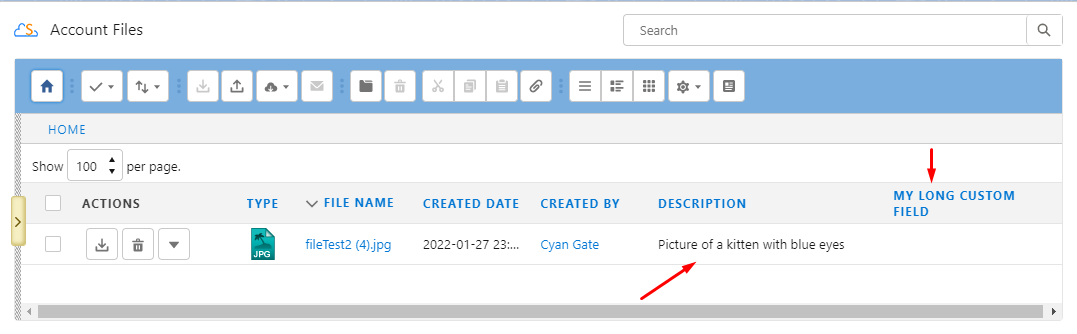
Here' the column heading wraps and the Description field is wider
These settings are configured with Custom Metadata Settings.
-
Go to Setup-> Custom Metadata Types
-
The first time using this, you need to add fields to the page layout.
-
Click on SDriveColumnConfiguration
-
Scroll down to Page Layouts and click Edit next to the page layout
-
Add the fields Location, Location Owner Id, and Code to the page layout
-
Click Save
-
Go back to Setup->Custom Metadata Types
-
-
Click “Manage” next to SDriveColumnConfiguration
-
You can clone the default record. Give your record a new label and name.
-
For Location, choose User, Profile, or Default
-
a User setting overrides a Profile setting. If neither is found, a Default setting will be used if there is one
-
-
For Location Owner Id, put the record id of the profile or user this setting should apply to
-
In the Code field, edit the code to set header wrapping and field width in pixels for whichever fields you want
-
The format of the code is as follows:
[
{
"fileObjectName":"cg__AccountFile__c",
"fieldList":[
{
"fieldName":"cg__File_Name__c",
"wrapEnabled": true,
"columnWidth": 100
},
{
"fieldName":"cg__Description__c",
"wrapEnabled": true,
"columnWidth": 200
},
{
"fieldName":"CreatedDate",
"wrapEnabled": true,
"columnWidth": 100
},
{
"fieldName":"LastModifiedDate",
"wrapEnabled": true,
"columnWidth": 100
},
{
"fieldName":"My_Custom_Field_with_a_Long_Name__c",
"wrapEnabled": true,
"columnWidth": 100
},
{
"fieldName":"cg__Tags__c",
"wrapEnabled": true,
"columnWidth": 200
}
]
}
]
It may be helpful to use a JSON validator to check your JSON code for formatting errors.
Column width settings do not affect which columns are displayed
Which columns to display is taken from S-Drive Configuration->Customization Settings or from Custom Setting->View Setting, which overrides it.
The custom metadata column width/header wrap settings described here only determine how to display a column, not which columns to display.