
Every object you want to use S-Drive with must have an associated S-Drive File object with either a master-detail relationship or lookup relationship where the file object is the child.
-
To create a custom file object:
-
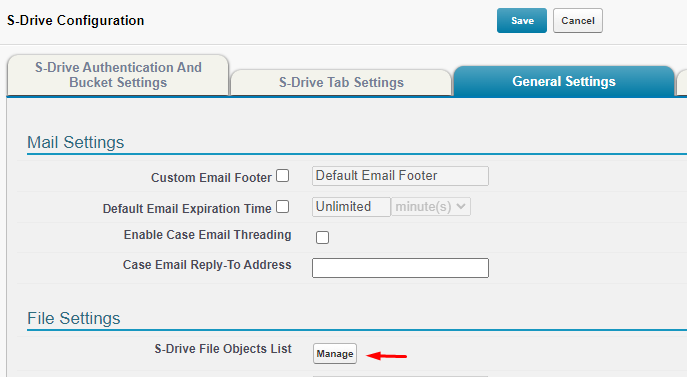
From the S-Drive App or App Launcher, go to S-Drive Configuration and click the General Settings Tab
-
Under File Settings, click the Manage button next to S-Drive File Objects List
-
On the next page, under Generate New File Object, select the parent object you want to use with S-Drive. The File Object name and label will fill in automatically. You can change these if you’d like to.
-
Click Generate Object
-
Your new File Object will be created. You can check it in Object manager. The default relationship to the parent is master-detail, but you can change it to lookup if that suits your needs.
-
Alternatively, you can create your file object using a spreadsheet and following these instructions.
-
-
Once your file object has been created, see Configuring Custom S-Drive file object on Lightning Page or Classic Override Page for S-Drive.
-
If you want to create a trigger to prevent a record from being deleted if there are files attached to it, see (Optional) Create a Before Delete Trigger for Custom Object
-
If you want to track File Activities on this file object (see File Activities and S-Drive Reports ), you must first create a lookup relationship in File Activity object with for this S-Drive file object. You can create the relationship from Setup > Objects > File Activity > Scrolling to "Custom Fields & Relationships" section > Clicking on "New" button > Select "Lookup Relationship" and select your new file object as "Related To" from the picklist provided.
When creating a custom file object, do not give it the same API name as the objects in the S-Drive Managed package (AccountFile, ContactFile, CaseFile, OpportunityFile, Lead_File). This will cause errors until the API name is changed.